
The Best Travel Apps for 2023
Hello! 2022 marked the definitive return of travel following the hiatus caused by the pandemic, and with this return comes something we travelers love: apps and websites to plan and enjoy our trips!The idea behind this post is to provide a brief overview of the apps that help us have a more stress-free trip and make the most of it. Some of these apps, of course, go beyond just travel use, and I use them in my day-to-day life. All of them are free—or at least, they have
Hello! 2022 marked the definitive return of travel following the hiatus caused by the pandemic, and with this return comes something we travelers love: apps and websites to plan and enjoy our trips!
The idea behind this post is to give a brief overview of the apps that help us have a more stress-free trip and make the most of it. Some of these apps, of course, go beyond just travel use, and I use them in my day-to-day life. They’re all free—or at least have a free version. Let’s get to the list!
For searching flights and transportation
Google Flights
https://www.google.com/flights
It’s currently the most widely used metasearch engine. It lets you search for flights, compare prices, and view trends. For me, the best feature is that it lets you track a flight’s price and automatically sends you emails when the price of a selected flight goes up or down.
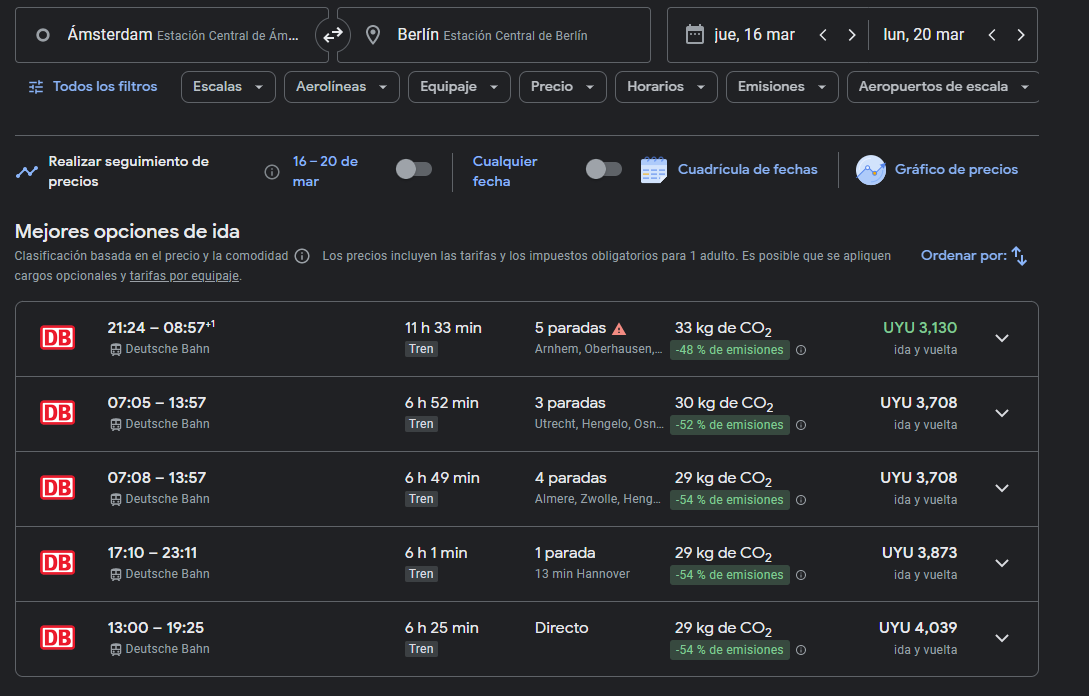
A little-known fact is that it also includes train searches, making it ideal for intercity travel and for comparing prices with flights:
SeatGuru
https://www.seatguru.com/
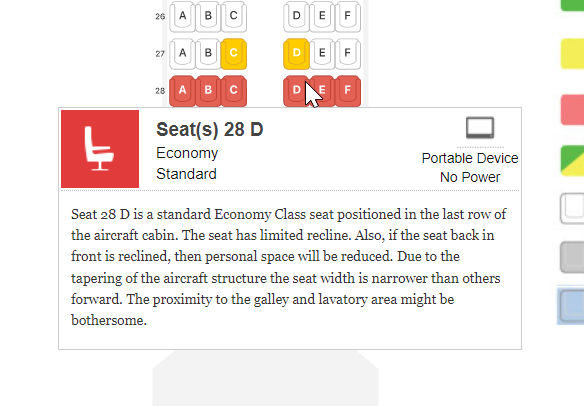
This is already a classic: it lets you search for a specific flight, see which aircraft is scheduled to operate it, and view a seat map showing the layout of that aircraft. This lets you compare aircraft types when selecting a flight, choose the best seat at check-in, and even read reviews about the pros and cons of each seat:
To book trips
AppInTheAir
The best app for booking and tracking flights! After using Tripcase for a long time and trying others like CheckMyTrip or TripIt, I found this app, which is far superior.
The user experience is much more modern, intuitive, and appealing, and it has many more features. In addition to tracking flights and receiving notifications about flight changes, it lets you save hotel information and important documents (vaccination certificates, passport, etc.), and it has an entire section dedicated to metrics and statistics on past trips (number of flights, destinations, total kilometers, CO2 emissions, etc.).
It syncs with your email to pull booking information, or lets you enter flights manually. It also allows you to import data via Excel, which makes it super convenient to integrate with information from other apps. I did this to import data from MyFlightRadar, and it worked perfectly.
MyFlightRadar
I’ve already mentioned this website here. I still use it because I really like the visualizations and metrics it generates, even though AppInTheAir now includes many of them as well.
Airline App
In addition to having all your trips centralized in one app, like AppInTheAir, it’s important to always have the app for the airline you’re flying with—and, of course, to make sure your flight details are entered correctly. There, you can access your boarding passes, check in, view more relevant flight information, and receive notifications in case of any changes. Some apps even show you the location of your luggage in real time!
Don’t forget to link your loyalty program to earn miles from your trip.
Asana or another app for creating checklists
Before every trip, I like to make sure everything is ready. This means checking that I have my documents, that I’ve updated my credit card for travel, that I have roaming enabled, and that I’m packing the things I’ll actually need, etc. For that, I already have a checklist set up that I simply tweak a bit for each trip—for example, if it’s a business trip, the clothes I pack or the devices I bring obviously change.
I keep this checklist in Asana because it’s an app I use regularly and find very convenient, but you can create one in any other app like Google Keep, Notion, OneNote, or even in Excel.
During the Trip
LoungeKey
https://loungekey.com/
A few months ago, Visa ended its partnership with Priority Pass, and now all access to VIP lounges is handled through LoungeKey. In my opinion, this is great news, because with Priority Pass, it was always unclear how many total visits were available, how many were still left, your usage history, the cost per additional person, and so on. In the LoungeKey app, you can see all that information very clearly.
In any case, it’s always important to check which program your card is partnered with so you can make the most of the lounges and avoid paying additional fees. Almost all cards that offer some form of mileage rewards provide access—albeit limited—to VIP lounges.
Google Drive or similar
Essential for storing all documents and relevant travel information: flight, hotel, and transfer reservations; a copy of your passport and vaccination certificates; boarding passes; and any other documents. At some point during the trip, you’ll definitely need this information, so it’s best to have everything organized and readily available.
The most important thing is to make that folder available offline so you can access everything at any time without relying on an internet connection. Another best practice is to share all that content with someone who isn’t traveling with you, so they can have all the details of your itinerary.
Flightradar
https://www.flightradar24.com/
Another classic that needs little introduction: it displays real-time information on air traffic around the world. You can see the plane’s position, altitude, heading, speed, and more. Ideal for when you’re at an airport and want to do a little “spotting” of planes.
AirFleet
https://www.airfleets.net/home/
The perfect complement to FlightRadar: it contains all the information on civil aircraft, including most of the world’s manufacturers (Boeing, Airbus, Embraer, etc.) It lets you search for an aircraft by its registration number (which you can get from FlightRadar), and you can view all the details about that aircraft (previous flights, configuration, livery, etc.).
At the destination
Google Maps
Needs no introduction. It’s essential for getting around any city, using public transportation, planning your itineraries with favorite spots, and finding attractions and great places to eat. If you don’t have data, you can download the maps so they’re available offline.
Uber/Cabify
These can save you in a pinch; it never hurts to have them installed and linked to a suitable payment method.
SettleUp
It lets you track expenses. When traveling—especially on a group trip—it allows everyone to enter their expenses, and at the end of the trip, it lets you “settle up” with everyone.
These are all the apps I find useful when traveling! Do you use them? Do you have any other favorites?
See you next time!