
Getting to Know Neo4j
As part of the master’s program I’m currently pursuing, I took a seminar on graph databases in recent weeks, focusing on the use of Neo4j. The seminar was organized by the Graduate Studies Center of the School of Engineering: https://www.fing.edu.uy/cpap Although I had already worked with other NoSQL databases, I hadn’t yet had the opportunity to work with graph databases, and the seminar was the perfect opportunity to learn a little about the subject. I think the most challenging part, at the time…
As part of the master’s program I’m currently pursuing, I took a seminar on graph databases in recent weeks, focusing on the use of Neo4j. The seminar was organized by the Graduate Studies Center of the School of Engineering: https://www.fing.edu.uy/cpap
Although I had already worked with other NoSQL databases, I hadn’t yet had the opportunity to work with graph databases, and the seminar was the perfect opportunity to learn a little about the subject.
I think the most challenging part of tackling any of these NoSQL paradigms is shifting away from the structured approach we’re used to with relational databases. Thinking outside the typical structures of relational databases is always a challenge, both when modeling data and when running queries.
What do you mean there are no schemas? What do you mean there are no indexes? How is it possible to insert any element, in any format? What about ACID properties?
In my experience with the NoSQL world (the Semantic Web, document databases, and now Neo4j), I’ve always found it difficult at first to “switch gears” and resist the temptation to try to “translate” concepts from RDBMSes.
Taking full advantage of these new approaches is closely tied to fully understanding the paradigm and working with a focus on that approach.
In the specific case of Neo4j, I found the Cypher query language particularly interesting. Once you start thinking in terms of graphs, Cypher becomes an extremely flexible and intuitive language.
If you’d like to take your first steps into the world of Neo4j, here are some tips to help you quickly start experimenting with a database!
Download and run Neo4j Community Edition
You can download it from https://neo4j.com/download-center/
Unzip the folder to C:\neo4j-community-3.5.3. To start it, go to C:\neo4j-community-3.5.3\bin and run the following in the command prompt: >neo4j console
This will launch the web UI at http://localhost:7474/browser/
From this UI, you can view your databases and run queries.
Loading a dataset
In the Neo4j installation folder, inside the `data\databases` folder, copy the dataset you downloaded from here: https://github.com/sophiamaiolo/Neo4j.git
This dataset was obtained from: https://neo4j.com/developer/movie-database/#_download
To start working with the database, add the following line to the neo4j.conf file located at C:\neo4j-community-3.5.3\conf: dbms.active_database=movies.db
From the web UI, we’re now ready to start running queries!
With `call db.schema()`, you can view the entire graph and better understand the data and its relationships.
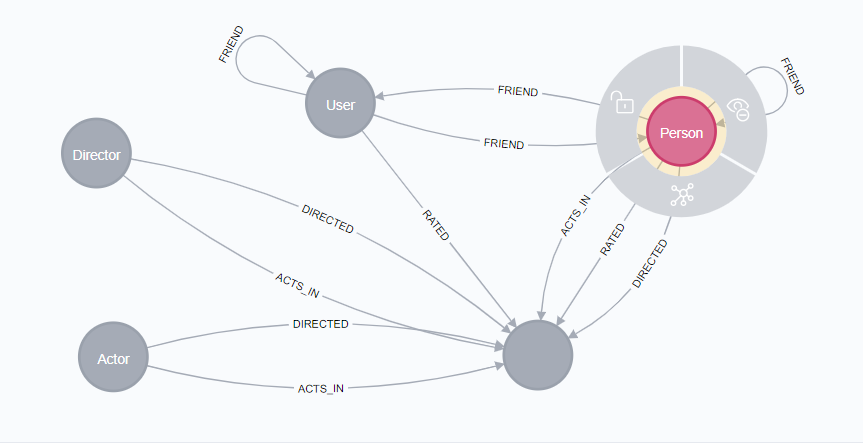
Querying the dataset
Here are some interesting queries you can run:
MATCH (a:Actor)-[:ACTS_IN]->(m1:Movie)<-[:DIRECTED]-(d:Director),(a)-[:ACTS_IN]->(m2:Movie)<-[:DIRECTED]-(d)
WHERE m1.title <> m2.title
RETURN a.name, m1.title, m2.title, d.name
MATCH (v1:Actor)-[r1:ACTS_IN]->(m1:Movie)<-[r2:ACTS_IN]-(v2:Actor)
WHERE v1.name = 'Kevin Bacon' AND v1.name <> v2.name
RETURN v1.name, v2.name, m1.title
MATCH (v1:Actor)-[r1:ACTS_IN]->(m1:Movie)<-[r2:ACTS_IN]-(v2:Actor)
WHERE v1.name <> v2.name
RETURN v1.name, collect(v2.name)
If you’d like to read more on this topic, the must-reads are:
Next Generation Databases: NoSQL, NewSQL, and Big Data.
Guy Harrison
Apress, 2015. ISBN 978-1-4842-1330-8
Concise Guide to Databases: A Practical Introduction.
Peter Lake and Paul Crowther,
In Undergraduate Topics in Computer Science, Springer-Verlag London, 2013. ISBN 978-1-4471-5600-0
See you next time!